Have you ever wanted to create a beautiful image but did not know how to use design software? Today, artificial intelligence makes this task much easier. You can describe your idea in simple words and use an AI tool to turn it into an image.
Opendream AI is an online tool that helps people create images using written descriptions. You do not need to be a professional designer to start. You can explore different styles, try new ideas, and create artwork for personal or creative projects.
In this guide, you will learn what Opendream AI is, how it works, its main features, its benefits, and how beginners can use it. You will also find helpful tips for getting better results.
What Is Opendream AI?
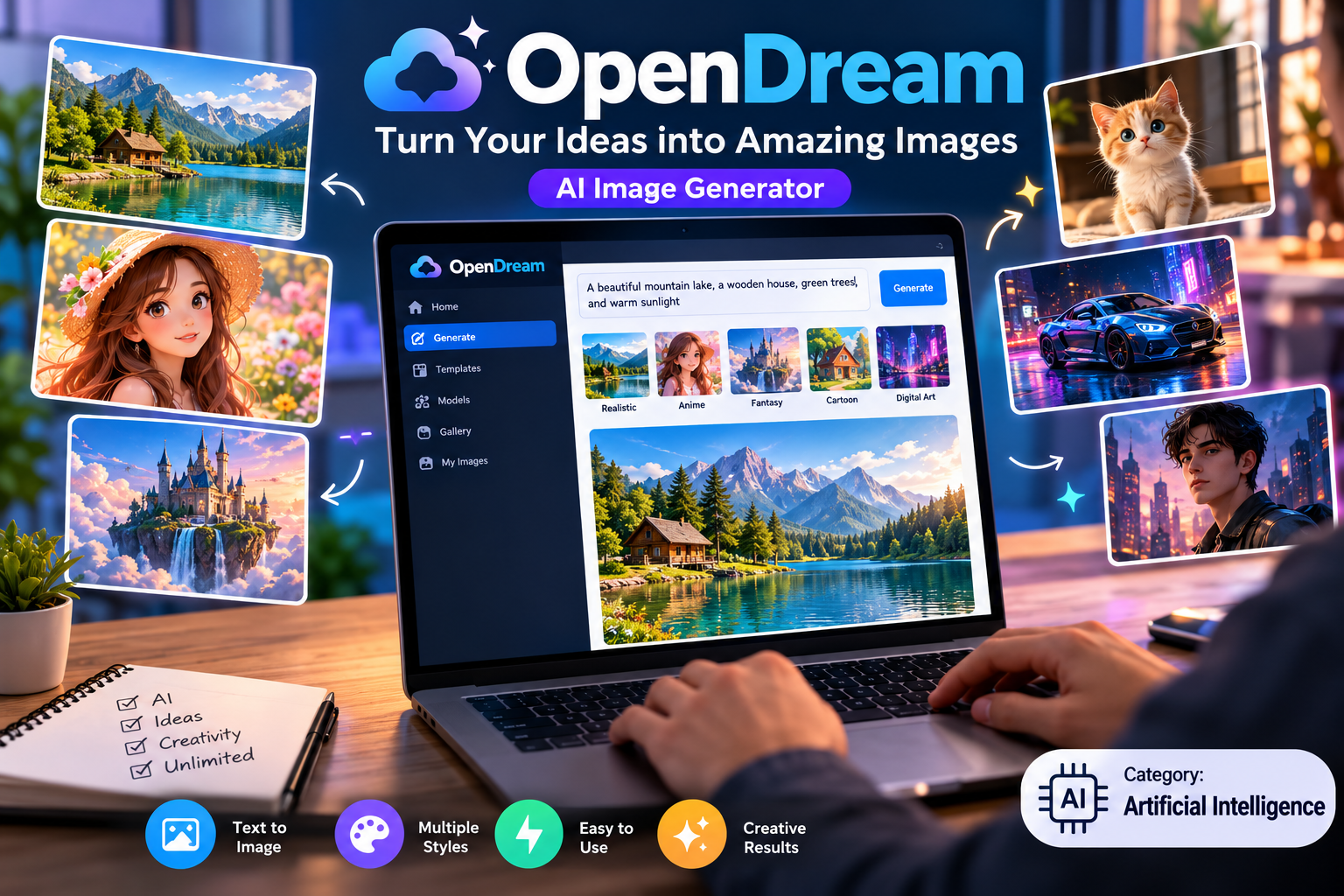
OpenDream AI is an online AI image generator. It allows users to describe an image in words and then uses artificial intelligence to create artwork based on that description.
For example, you can enter a prompt such as:
“A small wooden house beside a lake, green mountains in the background, warm sunlight, and a beautiful blue sky.”
The AI tool processes your description and creates an image based on the details you provide.
You can experiment with different ideas, including landscapes, characters, fantasy scenes, digital artwork, and other visual concepts.
The platform also offers templates and different image styles, making it easier for beginners to start creating artwork.
You can explore the official platform here: OpenDream AI. OpenDream
How Does Opendream AI Work?
Opendream AI uses artificial intelligence models to turn text descriptions into images.
The process is simple. You provide information about the image you want, and the AI model uses that information to generate artwork.
Here is how the process works.
1. Write Your Idea
First, think about the image you want to create.
Your description can include the main subject, background, colours, lighting, and artistic style.
For example:
“A cute white cat sitting near a window, soft morning light, realistic photography, and a peaceful atmosphere.”
A clear description helps the AI understand what you want.
2. Choose an Image Style
Depending on the available options, you may be able to select a template or an image-generation model.
Different styles can produce different results.
For example, you might want to create:
- Realistic photographs.
- Anime characters.
- Fantasy artwork.
- Cartoon illustrations.
- Digital paintings.
- Creative backgrounds.
Try different styles to find the one that best matches your idea.
3. Generate Your Image
After entering your prompt and choosing the available settings, start the image-generation process.
The AI will create an image based on your instructions.
The result may not always match your expectations perfectly. Sometimes, you will need to improve the prompt or try different settings.
4. Review the Result
Once the image is ready, check whether it matches your original idea.
Look at the colours, background, objects, and overall design.
If something is missing, change your description and generate another version.
This process allows you to explore new ideas and improve your results over time. OpenDream
Main Features of Opendream AI
Opendream AI provides several features that can help users create different types of artwork.
The available features may depend on your account and subscription plan.
Text-to-Image Generation
One of the main features is the ability to create images from written descriptions.
You do not need to draw everything yourself. Instead, you explain your idea in words and let the AI generate a visual result.
This feature can be useful for people who have creative ideas but lack drawing or graphic design skills.
For example, you can describe a futuristic city, a beautiful garden, or a fantasy character.
Ready-Made Templates
Templates can help you start a project without creating every setting from scratch.
You can select a suitable template and adjust your description to match your needs.
This is especially helpful for beginners who are still learning how to write effective prompts.
Templates can also save time when you want to experiment with several artistic styles.
Different Artistic Styles
Different image styles can help you create artwork for different purposes.
For example, realistic styles may suit landscape images, while anime styles may work better for fictional characters.
Choosing an appropriate style helps you move closer to your desired result.
Creative Image Ideas
AI image generators can help you explore ideas that may be difficult to draw manually.
You can combine different subjects, environments, colours, and moods to develop unique visual concepts.
For example, you could create a floating island, a futuristic classroom, or a magical forest.
These experiments can help you discover new directions for creative projects.
Image Generation Models
OpenDream’s official guide describes several image-generation models, including Dreamlike Photoreal 2.0, Dreamlike Anime 1.0, Stable Diffusion 2.1, and Deliberate.
The models have different strengths, and the options available can depend on your plan.
Check the current platform before choosing a model because features and availability may change. OpenDream
How to Use Opendream AI Step by Step
If you are new to AI image generation, follow these simple steps.
Step 1: Visit the Official Website
Open your web browser and visit the official OpenDream website.
You can use a supported browser on a computer or another compatible device.
Step 2: Create an Account
Follow the registration instructions if an account is required.
The platform’s guide describes account registration through options such as Google or Discord.
Read the sign-up information and select an option that works for you.
Step 3: Choose a Template
Explore the available templates and select one that matches the type of artwork you want to create.
If you prefer to start with your own idea, check whether you can skip the template.
Step 4: Enter a Prompt
Write a clear description of your image.
For example:
“A modern white house surrounded by green trees, large windows, a beautiful garden, natural sunlight, and realistic architectural photography.”
Try to explain the most important details rather than using only one or two words.
Step 5: Adjust the Settings
Review the available options, such as the image style, model, and aspect ratio.
If you are a beginner, start with the default settings and change them as you learn.
Step 6: Generate the Image
Click the image-generation button and wait for the result.
Generation time may vary depending on the service, model, and current demand.
Step 7: Save Your Artwork
Review the finished image and save it if you are happy with the result.
You can repeat the process with a revised prompt if you want a different outcome.
Always check the current platform instructions and terms before using generated images in public or commercial projects. OpenDream
How to Write Better Prompts for Opendream AI
A prompt is the text you provide to an AI tool to explain what you want it to create.
Writing a good prompt is one of the most useful skills you can develop.
Describe the Main Subject
Start by explaining what you want in the image.
For example:
- A golden retriever playing in a garden.
- A modern office with large windows.
- A colourful hot-air balloon above the mountains.
- A small coffee shop on a quiet street.
Clear subjects give your prompt a strong starting point.
Add Background Details
Next, describe the environment.
Instead of writing “a house,” you could write:
“A small stone house in a green valley, surrounded by tall trees and distant mountains.”
Background details help establish the scene.
Explain the Lighting
Lighting can change the appearance and mood of an image.
You can use descriptions such as:
- Soft morning sunlight.
- Warm sunset light.
- Bright studio lighting.
- Moonlight in a dark forest.
- Gentle light through a window.
Choose lighting that suits the subject.
Choose an Artistic Style
Add a style that matches your purpose.
For example, you could request realistic photography, digital painting, cartoon illustration, or anime artwork.
This gives the AI more information about the appearance you want.
Keep Your Prompt Clear
Long prompts are not always better.
The goal is to provide useful details without adding confusing or conflicting instructions.
Start with a simple prompt, review the result, and then add details where necessary.
Example Prompts for Beginners
Here are some original prompt ideas you can try with an AI image generator.
Nature Image Prompt
“A peaceful lake surrounded by green mountains, soft clouds in the sky, sunlight reflecting on the water, realistic landscape photography, natural colours, and fine details.”
Fantasy Art Prompt
“A magical castle standing on a floating island, waterfalls flowing into the clouds, glowing crystals, a colourful sunset, and detailed fantasy digital art.”
Product Photography Prompt
“A premium black wireless headphone displayed on a clean white table, soft studio lighting, realistic materials, minimal background, and professional product photography.”
Cartoon Character Prompt
“A friendly little fox wearing a blue jacket, standing in a colourful forest, cute cartoon illustration, soft lighting, and a cheerful atmosphere.”
Travel Image Prompt
“A beautiful street in Kyoto, Japan, with traditional wooden houses, a quiet walking path, green plants, soft morning light, and realistic travel photography.”
You can change the subjects, colours, and styles to create different results.
Benefits of Using Opendream AI
AI image generation can be useful for people with different creative interests.
Here are some possible benefits.
Easy for Beginners
You do not need advanced drawing skills to begin.
If you can describe your idea in words, you can start experimenting with AI-generated images.
This makes image creation more accessible to students, bloggers, hobbyists, and other users.
Saves Creative Time
Creating detailed artwork manually can take considerable time.
AI image generation can help you develop a visual starting point more quickly.
However, you may still need to edit the result, correct mistakes, or create several versions before you are satisfied.
Supports Different Projects
Generated images can help you explore ideas for blog graphics, concept art, presentations, and personal creative projects.
For example, a travel blogger might create a visual concept for an article about a mountain destination.
A student might use generated artwork in a presentation, provided the image is suitable and its use follows the relevant rules.
Encourages Experimentation
You can test different prompts and styles without needing to learn several complex design tools.
This makes it easier to experiment with creative ideas and discover what works best.
Useful for Visual Planning
AI-generated images can help you communicate an idea before starting a larger project.
For example, you could create a rough visual concept for a room, a fictional character, or a product display.
Remember that generated concepts may contain inaccurate details, so they should not replace professional plans or technical drawings when accuracy is important.
Who Can Use Opendream AI?
Opendream AI may be useful for several types of users.
Bloggers and Website Owners
Bloggers often need visual content to support their articles.
AI-generated images can help them explore suitable artwork for topics such as technology, travel, lifestyle, and education.
However, website owners should ensure that their images are relevant to the article and do not mislead readers.
Digital Artists
Artists can experiment with different visual ideas and use AI-generated images as inspiration.
The tool may help them explore colours, environments, character concepts, and alternative compositions.
Artists should review the relevant terms and copyright rules before using generated work in a commercial project.
Students
Students can use AI-generated artwork to explore creative concepts and prepare suitable visuals for presentations or personal projects.
They should follow their school’s or university’s rules about AI use and disclose it when required.
Content Creators
People who create videos, social media posts, and other online content may use generated artwork to develop visual ideas.
Before publishing, they should check image quality, platform rules, and any applicable rights or licensing conditions.
Small Business Owners
Small business owners can explore ideas for product displays, promotional concepts, and visual branding.
However, AI-generated logos and product images should be checked carefully before use. They may contain errors, unusual details, or similarities to existing designs.
Is Opendream AI Free?
Opendream’s official website advertises a free plan and paid subscriptions.
The pricing page lists a free option and paid Core and Pro plans. The exact features, credits, and prices should be checked on the official website before making a decision.
A free plan can be a practical way to test the service before spending money.
If you plan to subscribe, consider these questions:
- How many images do you expect to create?
- Are the available free features enough for your needs?
- Do you need access to additional image-generation models?
- Will you use the images for personal or commercial projects?
- Does the subscription offer enough value for your budget?
You can review the current options on the official OpenDream pricing page. opendream.ai
Can You Use Opendream AI Images Commercially?
Commercial use means using an image for a business or another activity intended to earn money.
For example, a person might want to use generated artwork on a website, in promotional material, or as part of a product design.
OpenDream’s official pricing page states that commercial use is available with its listed plans. However, you should read the latest terms and conditions before relying on that permission.
There are several important points to consider.
Read the Platform’s Terms
Check the rules that apply to your account and subscription.
Do not assume that every image generator has the same commercial-use policy.
Be Careful with Copyright
Permission from a platform does not automatically mean that every generated image is free from copyright or other legal concerns.
Copyright protection for AI-generated work varies by jurisdiction and may depend on the level of human creative contribution.
Avoid Unauthorised Material
Be careful when creating images that use protected logos, copyrighted characters, or recognisable people.
Consider whether you have the necessary rights or permissions before using such images commercially.
Check Images Before Publishing
AI-generated images may contain unexpected details, distorted objects, or visual mistakes.
Review every image before adding it to a website, advertisement, or product.
Limitations of Opendream AI
Although AI image generators offer useful features, they also have limitations.
Understanding these limitations can help you use the technology more effectively.
Results May Not Match Your Prompt
Sometimes, the generated image may not look exactly as you imagined.
You may need to rewrite your prompt or try another generation.
Small Details Can Be Incorrect
AI-generated images can contain mistakes in hands, faces, objects, text, or other details.
Always inspect the final result carefully.
Text May Look Unnatural
If you ask an image generator to include words in a design, the text may contain spelling mistakes or unusual letters.
For designs that require accurate text, you may need to add the wording separately using an image editor.
Some Features May Require Payment
The free plan may have limits on generation, model access, or other features.
Check the current pricing information to understand which options are available to you.
AI Images Need Human Review
An image may look attractive but still be unsuitable for your intended purpose.
Human review remains important for accuracy, quality, originality, and appropriate use.
Tips for Getting Better Results
If you want to improve your AI-generated images, use these simple tips.
Start with a clear idea. Decide what you want the image to show before writing your prompt.
Use specific details. Describe the subject, background, lighting, and style.
Try different versions. Small changes in wording may produce different results.
Choose a suitable image ratio. A wide image may suit a website banner, while a square image may work better for a social media post.
Review the final image. Check for strange details, incorrect text, and unwanted objects.
Save useful prompts. Keep a record of prompts that produce good results so you can reuse or improve them later.
Check usage rights. Read the platform’s rules before using images commercially.
These simple habits can help you develop better prompts and make more effective use of AI image-generation tools.
Opendream AI vs Traditional Graphic Design
AI image generation and traditional graphic design serve related but different purposes.
| Feature | Opendream AI | Traditional Graphic Design |
|---|---|---|
| Main method | Generates images from prompts | Uses manual design and editing |
| Drawing skills | Not always required | May be helpful |
| Creative control | Depends on prompts and available settings | Often allows precise control |
| Speed | Can generate initial images quickly | Time depends on the task |
| Editing | Depends on available tools | Can offer detailed manual editing |
| Best use | Generating visual ideas and artwork | Precise layouts and detailed design work |
Neither method is best for every situation.
AI image generation may be useful when you want to explore ideas quickly. Traditional design tools may be better when you need exact text, precise layouts, or detailed control over every element.
Some creators use both methods to achieve their desired results.
Is Opendream AI Suitable for Beginners?
Opendream AI can be a useful starting point for beginners who want to explore AI-generated artwork.
Its text-based approach allows users to describe an idea rather than draw everything themselves. Templates and image styles can also help new users get started.
However, learning to write effective prompts takes practice.
Beginners should start with simple projects and gradually experiment with more detailed descriptions.
It is also important to learn the basic rules of image licensing, privacy, and responsible AI use.
By combining clear prompts with careful review, new users can develop their creative skills and better understand what AI image generation can achieve.
Frequently Asked Questions About Opendream AI
What Is Opendream AI?
Opendream AI is an online tool that generates images from written descriptions. Users can explore different artistic styles and create visual content with the help of artificial intelligence.
How Do I Use Opendream AI?
Visit the official website, create an account if required, select a template or suitable settings, enter your prompt, and generate an image.
Is Opendream AI Free to Use?
The platform advertises a free plan with limited features, as well as paid subscriptions. Check the official pricing page for current details.
Do I Need Design Skills to Use Opendream AI?
No advanced design skills are required to get started. However, learning how to write clear prompts and review generated images can help you achieve better results.
Can Opendream AI Create Realistic Images?
Yes. The platform offers image-generation options designed for realistic artwork, alongside other styles. The final quality depends on the model, prompt, and settings.
Can I Use Opendream AI for Blog Images?
You can explore AI-generated images for blog content, provided their use follows the platform’s terms and any applicable legal requirements. Check each image carefully before publishing.
Can I Use Opendream AI for Commercial Projects?
The official pricing page lists commercial use as an available feature. Read the current terms carefully to understand the permissions and restrictions that apply to your account.
Does Opendream AI Work in a Browser?
Yes. Opendream AI is accessible through a supported web browser, so you can use the online platform without installing a separate desktop image-generation application.
How Can I Improve My AI Images?
Write clear prompts, describe the subject and background, select a suitable style, and experiment with different versions. Review the results and adjust your prompt when necessary.
Is Opendream AI Good for Content Creators?
It may be useful for bloggers, social media creators, artists, and other people who need visual ideas. Users should review image quality and usage rights before publishing their work.
Conclusion
Opendream AI offers a simple way to explore image creation with artificial intelligence. By describing your ideas in words, you can generate artwork without needing advanced drawing skills.
The platform can be useful for bloggers, students, digital artists, and content creators who want to experiment with different visual styles.
To get better results, write clear prompts, try different settings, and review every image before using it. You should also check the platform’s current pricing and usage rules, especially if you plan to use generated images for business purposes.
If you are interested in AI image generation, Opendream AI may be worth exploring as part of your creative workflow.
Start with a simple idea, experiment with different prompts, and discover how AI can help you bring your imagination to life.